
Forgot Your Password? No Problem!
Hey, it happens - life gets busy and sometimes passwords slip our minds. No worries! Getting back into your CoastHills Online Banking account is quick and secure. Just follow these steps and you’ll be up and running again in no time.
For security, online banking will lock you out if you enter the wrong password five times in a row.
Step 1: Start at the Top
Head to the top of the CoastHills website, click the “Login” button, then choose “Forgot Password?” to get started.
Step 2: Confirm It's Really You
For your protection, we’ll ask you to enter one of the phone numbers you’ve already set up for multi-factor authentication. This helps us make sure it’s really you.
Security tip: If the wrong number is entered three times, the password recovery tool will lock. If that happens, just give us a call or stop by a branch and we’ll help you reset things safely.
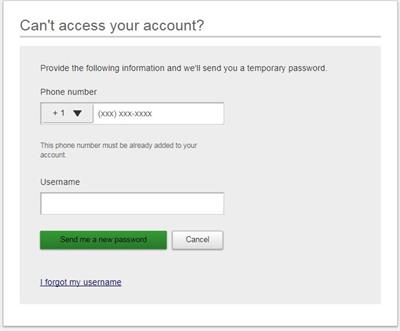
Forgot Your Username?
No problem - just click the “Forgot Username” link and enter your email address. If it matches what we have on file, we’ll send your username straight to your inbox.
Note: You’ll always get an email notification whenever your password is changed or reset, just to keep you in the loop.
Step 3: Get Your Temporary Password
Once we’ve verified your phone number, we’ll send a 6-character temporary password by text or phone call.
(No emails here - just a fast, secure code straight to your phone.)
This temporary password is a mix of letters and numbers, and it expires in 30 minutes, so be sure to use it right away.
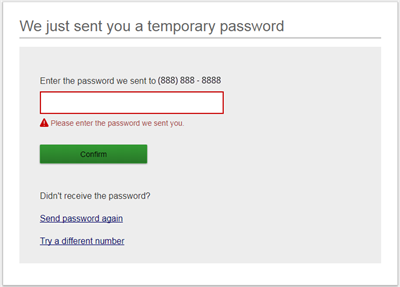
Step 4: Create Your New Password
Now you’re almost there. Enter the temporary password again, then choose a new password that you’ll use going forward. You’ll be asked to confirm it just to make sure everything matches up.
Use the SHOW/HIDE toggle to see what you’re typing if needed.

That’s It - You’re Back In!
Once your new password is set, you’ll be ready to go.
CoastHills Credit Union is a full-service financial institution with 11 Central Coast locations throughout Santa Barbara and San Luis Obispo counties.
Wallet-friendly rates
Count on us for great loan rates and earnings on your savings.
Bank confidently
 Related Calculator
 Related Article
 Online Banking
 Mobile Banking
 Membership/Join
FAQs
Your questions answered
Your PIN number is 1234 and the last four digits of the primary account holder's Social Security Number.
A CoastHills Member Services Officer at any of our 12 Central Coast locations can assist you with a wire transfer. To get started, you'll need the following information:
About you and the transaction -
Your name and 13-digit account number
About the receiving bank -
Financial institution name, address and routing number.
For transfers to CoastHills, please use the following information:
CoastHills Credit Union
1075 E Betteravia Rd
Santa Maria, CA 93454
CoastHills Routing Number: 322270822
You can easily sign up for eStatements from both Online and Mobile Banking.
After logging in, select Additional Services then eStatements. From there, you'll click Enrollment at the top of the page, select Electronic then Submit. Review the eSign Agreement then select I Agree at the bottom of the page.
We are not currently offering Zelle through our Online or Mobile Banking platform.